Sunday, November 13, 2011

Building a Display Board Part 3: Rubble, Roads, and Warp Energy

A good couple of weeks of construction has gone into our display board at this point, and now is a perfect time to step back and get some perspective before we move on. Let's revisit the very first schematic I made for my demon display board a few months back.

As you can see, my grandiose ideas for the board have been altered somewhat. I've pared the buildings down from seven to 2 1/2 (one is merely a flanking facade for a statue), and the general layout has been compressed. This is what I mean when I refer to "letting the board tell you what works." I was a bit off in my estimates for the scale, and when reality set in during construction, I simply altered my plans and went with the flow. Remember, this is a good thing! Let realism assert itself in the construction of your piece, things that should work, will, and those that don't, won't.

That being said, step back and take a look at your display board, and then at the initial schematics you wrote up. Now that construction of your piece is well under way, a little more planning will help determining how you should proceed. Looking at my piece, I have a good foundation, but there is something missing. At this point in construction I don't know what it is yet, but I will soon find out! How do I know this? Because the piece will tell me, it won't look right until it is complete. Don't get frustrated if your piece isn't looking quite the part yet, there's still plenty of time to figure things out.


With the main buildings in place and the road marked off, I'm ready to proceed. However, two main features are still not present on the board: the warp gate and the fallen statue. We'll get to those in a bit.

As for the materials we'll need this week:
1. Felt-tipped marker
2. Styrene sheet roadway (more info below)
6. Glue applicator (can be as simple as a flat piece of extra foam board or a sturdy paint brush)


As a general rule, get all your foundational components onto the board first. In my case, this leaves the road to be completed. I'm using Plastruct's cobblestone (product code PS-74) for the pavement of my roadway. One package of the cobblestone held two sheets, which was just enough for my uses (If you need more than two-feet of roadway, etc. buy more than one package).


Styrene sheet is very easy to cut and scissors are recommended for a clean straight edge. The warp gate in the north-west corner will be spilling warp energies into the city and tearing up the landscape it touches, so the road will be modeled as if its being sundered. To do this I simply marked the road with a felt-tipped marker and cut along a jagged pattern to create an uneven look of devastation.

With the road placed, mark along the edges with a felt tipped marker.


The roadway will be laid into the board within a depression. To create the depression, take your wire brush and brush parallel to the lines drawn for the borders of the road. Apply a moderate amount of pressure to remove 1/8-1/4 inch of foam.


To get an even depression, pull the brush perpendicular to your previous brush strokes. This will remove any foam left by the gaps in the bristles from the parallel stroke and create a smooth, even surface.


An appropriate roadway depression should be about 1/8 to 1/4 inch in depth.


Sunday, October 30, 2011

Building a Display Board Part 2: Scenery & Details

This week we're picking up where we left off in constructing a display board. Last time, as you may well remember, we built up the board's foundation with two simple materials: composite board, and insulation board with the use of a hand-saw, a box cutter, and some all-purpose glue.

As we continue this week, here's the tools/materials we'll need:
3. Box cutter
4. Shop vac
5. Fine grain sandpaper
5. Felt tipped marker
6. Small caliber x-acto blade
7. Plaster, I use Woodland Scenic's Mold-A-Scene Plaster, it incorporates a light weight ballast which gives the texture an integrated rocky appearance


Now that the foundation's glue seal has set for a least 24 hours we're ready to continue with the construction of the board and get started on the fun part, building terrain.

In order to create organic transitions between the layers on our board, we first need to ready the layers by trimming their edges. To do this, run your box cutter at an oblique angle to the corner, making sure that your cut pierces the foam on the lower side. What this does is remove the sharp corner on the higher layer, readying it to be smoothed to meet the layer below it.

This is what the top layer's edge should look like after the corner has been removed.


Now that there is a smoother surface, we'll continue the transition by brushing the edge with our steel brush. Apply enough pressure to shave off the foam while brushing, but don't apply too much pressure that you start creating deep grooves. After you have brushed in one direction, turn your brush and come at it from another direction. My method is to brush down the slope I wish to create, and then turn my brush perpendicular to my previous strokes and brush the face of the slope. This will ensure that unnatural grooves don't form from brushing in only one direction and a clean slope forms.

Use your shop vac to suck up the foam debris often, this technique creates a mess!


Make the slope gradual, this will keep your models from having to struggle to keep from falling over.

To finish the slope-transitions, sand the slope with your fine grain sandpaper.


For the lowest of the three levels I'm choosing to have an abrupt transition and will keep the straight up and down edge. This will effect the appearance of a retaining wall.

Sunday, October 23, 2011

Building a Display Board Part 1: The Foundation

With armies on parade taking a leading role at GW events and garnering lots of praise. Therefore, it's only fitting that this post focuses on the basics behind making a foundation for an army display board. We'll be taking a look at creating a display board in parts, first, focusing on the board's foundation, second, creating terrain effects and scenery fit for an army, and third, painting and finishing the board. I'll take you along step-by-step as I create the display for my Daemons of Tzeentch army, let's get started!


First we need to gather together our tools and supplies, we'll need:
1. 1/4" thick wood board (not pictured), I used composite board for its rigidity
2. 1/2" insulation foam board, sold in 8'x4' sections
3. Handsaw or other wood cutting device
4. Box-cutter
5. Glue, I used Titebond all-purpose
6. Tape measurer
7. Felt tipped pen
8. Applicator (not pictured), for spreading glue, I used an old paint brush


Start construction by marking two 2'x2' squares onto your insulation board. Cut them out with your box cutter, a three/fourths deep-cut on one side of the board and then bending on the seam should give you a clean split.


Cutting out two sections will give us the ability to create a good measure of gradation to the terrain. If you don't want to have any hills or only slight change in terrain elevation, one 2'x2' section will do just fine.


Next, mark your base board with a similar 2'x2' outline and cut. Yes, I did feel old school using a handsaw. A point of note, keep the saw as horizontal to the plane of the board while cutting, this will give you a straighter cut along your line. Dipping the saw "nose down" will allow you to easily wander off your line.


If the board is warped and doesn't sit flat on the ground, get another piece that will, you'll regret a wobbly board later!


Put on a liberal application of glue to the wood board surface.


Use your applicator to spread the glue evenly across the board, making sure to get glue all the way to the edge. If you're working in a location where you don't want to make a mess, put down a tarp or plastic sheet to prevent overflow from marring your flooring surface.

Saturday, October 1, 2011

The Sartoris Campaign and A Table for Home


The dark shadow of war is slowly casting its midnight pall over the Sartoris System, a system of three planets, ruled over by a yellow sun, and an entourage of eight moons. It is a region of building darkness, where menace hides its traitorous visage amongst the teeming masses of Aequus Hive and manufactures its plots on the forgeworld Lux. Something sinister is even rumored to stir beneath the surface of Reach's enigmatic surface, whispering dark promises. In preparation for the coming conflict, armies both local and from afar are amassing on the system's borders and hastily shoring up planetary defenses. It is in this time of rising upheaval that only one thing remains certain, the grim darkness of the far future promises only war!

For the past few months I have been working on the details for a 40k campaign, and at long last the battle for the Sartoris System has begun! The campaign will rage across the three main planets: the mining colony on the gas giant Vitral, Aequus Centrus the main hive city of Aequus, and through the manufacturing district of the forgeworld Lux. In addition, some of the planets' moons will be up for conquest: Vitral's forest moon Sinceros and craggy moon Canis, Aequus' outpost moon Reach, and Lux's sun scorched rock Crassus.

This is a really fun opportunity to play some unorthodox games, and use a unique set of rules made to simulate total system combat, there's even a mechanic for fighting ship battles and scuttling blockading fleets! As the campaign progresses the map below will be updated on a weekly basis with which territory is held by which faction, where each player's fleet is currently at anchor or in orbit, and what planetary resources have been claimed. Check out our campaign page on facebook!


A really cool aspect of the campaign is that some battles must be fought on specific tables. An example of this is the moon, Reach, which contains only one territory tile. All battles fought on Reach must be played on the table in my basement.


I built this table in high school a few years ago and it has been a great investment. When friends want to come over and play late night or in privacy my table is our venue of choice.

The table features 4+ cover saves in the form of trees, rocks and ruins; 5+ cover saves in that of bushes; and even 6+ saves in that of fences. I hardly play games elsewhere where a 6+ cover save is taken, but I suppose it's better than nothing!


Reach features a fully functional Imperial Guard outpost, complete with perimeter fence, mine field, tank traps, perimeter defense guns, and interior defense emplacements. Unfortunately for the guardsmen stationed here, they were the target of a particularly brutal assault. One of my favorite casualties is a guardsmen reduced to his boots (there's a pair of boots around back of the outpost where he was snatched out of them, see if you can find them!)


In addition to the guard outpost, a collection of four ancient shrines lie off to the west. The purpose of the shrines is mysterious and their geometric ornamentation is thought to be of some significance. The ruins predate that of most known civilizations, and most assuredly were not built by human hands.. were they built by some sort of pre-race of old ones?


Something sinister has been taking place on Reach, and as evidenced by these corpses it has something to do with Chaos..


A raging river splits the table almost in half... obviously the guardsmen planned on putting their amphibious Chimeras to good use!

Monday, September 26, 2011

Lost in the Warp: Found Pictures


Drifting amongst the pernicious winds of the immaterium (that's the way I like to think of the internet) a number of lost pictures have been recently reclaimed from its murky depths. Ok, so maybe finding a few lost pics isn't that dramatic, but hey, I like to think of my email inbox as a particularly cluttered corner of the warp. In the "drafts" folder of my gmail account I stumbled upon an email that was never sent, and lo and behold, it held the pics of my grotesques as greenies!


I built all three from the ground up, using paperclip frames and layering on a rough foundation of green stuff before adding layers of green stuff musculature. GW Talos/Cronos bitz were used to accent the pieces and give them a uniquely Dark Eldar look.


These pictures were taken immediately after I finished sculpting the three grotesques back in July. It was my original plan to enter the three as a squad submission for the 2011 Chicago Golden Demon competition. However, I only had two weeks from the time these pictures were taken to get them finished, and somewhat bittersweet, I abandoned that project to complete what became a runner up in the diorama category for the year's GD.


The finished diorama in all its violent glory.


The idea to do a battle-scene with Tau Fire Warriors and a Grotesque came from the initial plan to use fire warriors as scenic casualties in the squad entry. With the squad nixed I knew that Tau would be the perfect adversary for the diorama!


A critique I got from James Craig, Phil Kelly (I think it was him judging), and others was that the basing needed higher levels of detail and highlights. I couldn't agree more. The entirety of the basing, from blank wood to finish, took the last 24 hours I had before my plane flight to Chicago on Friday. James stated that, "the models look more painted than the basing, and the basing looks more realistic than the models." I felt humbled simply to be receiving advice from a multiple GD winner. It was an awesome experience.


I wanted to give a strong feel of action to the scene, hence the crawling Tau and the one getting slashed. The slashed Tau is caught off balance, about to be launched bodily through the air, after receiving a particularly grievous wound to the chest. The blood flecking his armor and the surrounding rocks gives the impression that his death is a messy one. I have to admit, I was a bit conservative with the blood splatter and gore... I didn't want to mess up my GD entry at the eleventh hour because I got too gore happy!


The whole thing was an awesome experience that was months in the making. I had a blast in Chicago hanging out at Games Day and getting to meet some of the best painters in the business. It truly is a satisfying experience to take a concept out of the depths of your imagination to the reality of the table top.


Sunday, September 11, 2011

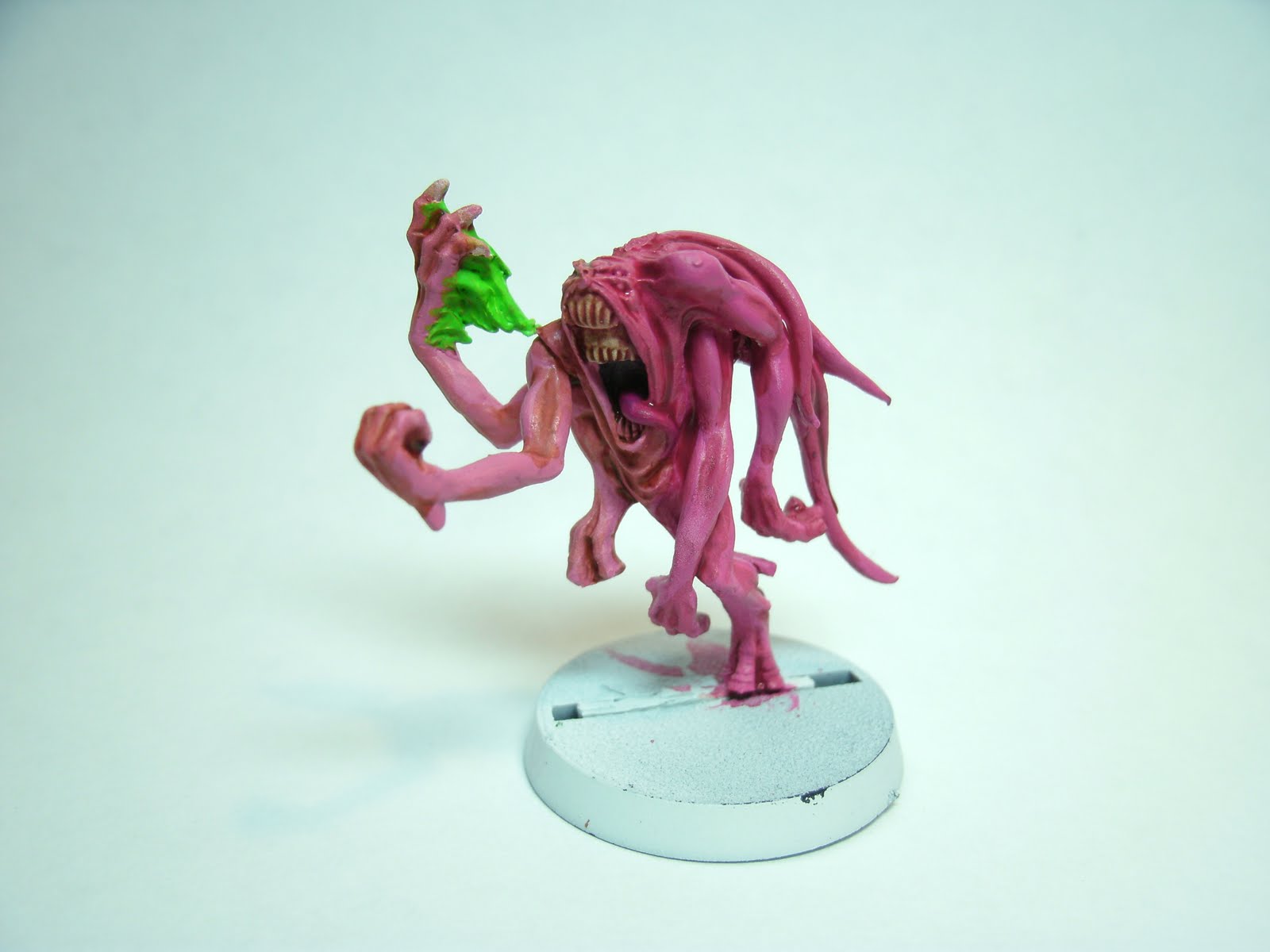
Wet Palette Workshop: Pink Horrors

Back in August I did a piece on how to make your own wet palette. In that post I focused on the principles of using a wet palette and some of it simple concepts. Switching from dry painting to wet blending is a huge step forward for anyone's hobby, but it also comes with its own list of complications as well as benefits.

In this post I'll take you through a step-by-step of how to take a model (in this case a pink horror) from prime coat to the table. I'll also address some of the bumps-in-the-road you may encounter from using this technique and little tips to help you paint smarter.


To get started let's go over our checklist: painting mat (in my case an exacto cutting board), wet palette, mixing brush (to blend paints on palette, I use an old standard dry brush), basing brush, fine detail brush, paints, water, towel/napkin, good lighting source (I prefer a fluorescent desk lamp for a bright, clean, white light), and a cup of your favorite caffeinated beverage (mine's green tea with lemon).

Begin by cleaning your model of extra flash or mold lines (I miss them sometimes in my excitement to get painting) and apply a primer coat. For many projects that are flesh or lighter colors I choose white primer to keep the colors bright. When it comes to large scale models with lots of recesses, shadowing or armor plating I prefer black. In this case we'll use white for the pink horror.


This particular pink horror is going to have two primary base colors, magenta and pink. Using a wet palette will allow us to seamlessly blend the two colors together to give the effect that the horror is shifting color. If you are uncomfortable painting two side-by-side bases apply the following steps, but with only one base.

To achieve the magenta base we make a 1:1 blend of Warlock Purple and Bleached Bone. To do this pour out a drop of paint from your pot that is about the size of the tip of a pencil eraser. Pour the warlock and bone onto the wet palette side by side, take your mixing brush and gently swirl the two colors together. Take care not to push too hard as you may rupture the waxed paper palette surface if you do. Also, mix the paints together and spread them onto the palette so that a thin layer of paint covers the palette's surface, too much paint in one area won't benefit from the palette's wet property.

For the second base, mix a 1:1:1 blend of warlock, bone, and Elf Flesh. Apply both bases in thin even coats, completely covering the primer coat. Because we're using a wet palette the paints should apply smoothly, without clumps. If you paints are too watery, clean your brush, dip it back into the paletted paint and gently wipe it on your cleaning surface to remove excess moisture. If this problem persists, leave your palette exposed for a few minutes, this should dry the paints slightly.


You may be thinking that that is a lot of instruction just to put a couple of base coats on a model. It is, but the main focus of this post is to not only show how to wet blend, wash, and base, but to also talk about the thought processes and the philosophy of the techniques. By doing so you should gain perspective and not just replicate the process, but understand how it really works. You can get a "1,2,3 guide" anywhere, we'll strive to go a little deeper than that. Let's continue.

With the body base coats complete, let's move on to detail base coats. At this stage you want to base anything that could run a risk of smudging its paint onto further higher coats on the body of the mini as you continue painting. The flame is a good example of this, and so is the inside of the mouth and tongue. Paint anything now that is in deep recess (mouth) or contains a broad surface (flame).

To do the inside of the mouth mix a tiny amount of Chaos Black to the edge of you magenta mixture. For the tongue, a straight warlock base should do nicely.

To give the flame a fire effect we'll base it with its lightest shade first, then add darker shades to the raised portions (this gives the effect of intense heat/energy at the flame source and diminishing heat as it radiates out). Base the flame Scorpion Green.


With the primary bases done, its time to add recess shadowing and depth. For the lighter pink side apply a Gryphonne Sepia wash into the skin folds, grooves, and areas between appendages. You don't need to cover the whole model, just the recesses.

For the darker, magenta side mix a 1:1 of warlock and sepia and paint it in as the previous wash. The wash mixture may need a tiny amount of water added to bring it to wash consistency, use moderation in this case.

Related Posts Plugin for WordPress, Blogger...